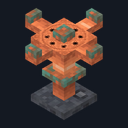
Crop Sprinkler
Crafting table
- Iron bars ×1
- Copper ingot ×3
- Bucket ×1
Top row: empty, Iron bars, empty. Middle row: Copper ingot, Bucket, Copper ingot. Bottom row: empty, Copper ingot, empty.
Water a 9×9 field and grow its crops about 2.5 times as fast
Early accessBlock mod in Farming & food
In the Farm & Pantry collection
Free on 20 November
Its free download opens here on 20 November, with no account needed.
Consoles and Java Edition can’t import packs.
Every ModChest mod is checked against the others, so no two use the same block, item or creature.
Place the Crop Sprinkler among your crops with a water source beside it, diagonally beside it, one block lower or right under it. Every 5 seconds it sprays the 9×9 square around it: all farmland on its level and one level down becomes fully watered, and each growing crop in the square gets a small extra chance to grow one stage. A field of wheat that takes about an hour to ripen on its own takes about 23 minutes. Use the sprinkler to see how many crops it reaches and how many are ripe.
It grows wheat, carrots, potatoes, beetroot, melon and pumpkin stems, sweet berry bushes, torchflower crops and pitcher crops. Ripe melon and pumpkin stems get the same extra chance to grow their melon or pumpkin into an empty space beside them over farmland, dirt or grass, just as they do on their own. Apart from that it never plants, harvests or tills anything, crops from other add-ons are left alone, and ripe crops wait for you. Without water it does nothing and tells you so. A crop in reach of several sprinklers grows no faster than with one. Like crops themselves, it only works while you are nearby.
Crafting table
Top row: empty, Iron bars, empty. Middle row: Copper ingot, Bucket, Copper ingot. Bottom row: empty, Copper ingot, empty.
0.1.0
First release
Minecraft Bedrock shows its version number in the bottom-right corner of the main menu. Everything on ModChest is built for Bedrock 1.26.45 and newer, on Android, iPhone, iPad and Windows. If your number is lower, update Minecraft from the store you installed it from, then import the mod.
Where the file lands, how to open it with Minecraft, and what to do if the import fails.
Each has its own download.

Item mod

Item mod

Item mod
Block mod
Item mod

Item mod

Item mod
Texture pack
The ModChest app for Android, iPhone and iPad keeps a list of everything it sends to Minecraft, and shows when one has an update. About the app