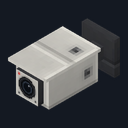
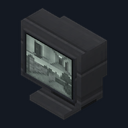
Security Camera
Crafting table, makes 2
- Iron ingot ×4
- Glass pane ×1
- Redstone dust ×1
3 wide and 2 tall, anywhere on the grid. Top row: Iron ingot, Iron ingot, Iron ingot. Bottom row: Glass pane, Redstone dust, Iron ingot.
Watch every corner of your base from one monitor, camera by camera
Free2 blocksBlock mod in Building & decor
.mcaddon file, 140 KB. Consoles and Java Edition can’t import packs.
Every ModChest mod is checked against the others, so no two use the same block, item or creature.
Craft Security Cameras two at a time and place them around your base. Each camera turns to face you as you place it, so stand where you want it to look and put it against a wall, a ceiling beam or a post. Then place a Security Monitor wherever you like to keep watch.
Use the monitor and your view jumps to the nearest camera, looking out from its lens and slightly down, while you stay standing at the monitor. The line above your hotbar names the camera, like "Camera 1 of 4". Jump to switch to the next camera, from nearest to farthest and back round to the first, and crouch or use the monitor again to leave: your view comes straight back to where you stood.
A monitor sees every camera within 32 blocks of it, in any direction, and nothing farther. Your own character stays at the monitor while you watch, where mobs can still reach you, so taking damage, or walking more than a step and a half away, ends the view at once. Breaking the camera you are watching moves you on to the next one, and breaking the monitor ends the view.
Crafting table, makes 2
3 wide and 2 tall, anywhere on the grid. Top row: Iron ingot, Iron ingot, Iron ingot. Bottom row: Glass pane, Redstone dust, Iron ingot.
Crafting table
Top row: Iron ingot, Iron ingot, Iron ingot. Middle row: Iron ingot, Glass pane, Iron ingot. Bottom row: Iron ingot, Redstone dust, Iron ingot.
0.1.1
Watching no longer searches the whole range every 2 seconds; a camera placed while you watch joins at your next jump
0.1.0
First release
Minecraft Bedrock shows its version number in the bottom-right corner of the main menu. Everything on ModChest is built for Bedrock 1.26.45 and newer, on Android, iPhone, iPad and Windows. If your number is lower, update Minecraft from the store you installed it from, then import the mod.
Where the file lands, how to open it with Minecraft, and what to do if the import fails.

Item mod
Block mod
Block mod
Block mod

Item mod
Block mod
Block mod
Item mod
The ModChest app for Android, iPhone and iPad keeps a list of everything it sends to Minecraft, and shows when one has an update. About the app