Village Baker
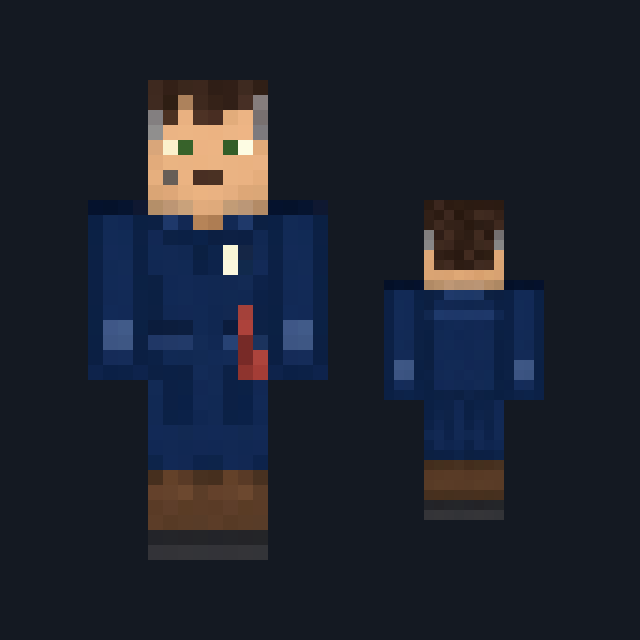
Cream cap and apron over a slate-blue shirt, with checked trousers and clogs.
Village baker skin in a cream apron and checked trousers
FreeSkin in Casual & cozy
.mcpack file, 7 KB. Consoles and Java Edition can’t import packs.
Cream cap and apron over a slate-blue shirt, with checked trousers and clogs.
Classic arms are four pixels wide, like Steve’s; slim arms are three, like Alex’s. Pick whichever fits the outfit in the Dressing Room.
Village Baker has been up since the ovens were lit. A soft cream cap with a folded band sits on every side of the head above dark brown hair, and the front of the head alone shows warm tan skin with dark eyes and a small set mouth. A cream apron covers the chest over a deep slate-blue shirt, with a rust-red neckerchief at the collar and a cream cord tied at the waist; the back carries the shirt with two crossed cream apron ties, and the apron edge runs down each side. The sleeves are slate blue to a rolled cuff at the elbow, with bare tan forearms and hands below. Near-black and cream checked trousers fall to plain dark brown clogs. This free Minecraft Bedrock .mcpack includes one original outfit in classic and slim arm fits. No bread, tray or ability is included, and nothing about the pack changes anything but your appearance.
0.2.0
Updated
0.1.0
First release
Minecraft Bedrock shows its version number in the bottom-right corner of the main menu. Everything on ModChest is built for Bedrock 1.26.45 and newer, on Android, iPhone, iPad and Windows. If your number is lower, update Minecraft from the store you installed it from, then import the skin.
Where the file lands, how to open it with Minecraft, and what to do if the import fails.

New skin pack

Skin

Skin

Skin

Skin

Skin

Skin
The ModChest app for Android, iPhone and iPad keeps a list of everything it sends to Minecraft, and shows when one has an update. About the app
